
Last reviewed: October 6, 2025
When a sales ops leader asks whether their SDRs can use a generative AI assistant on customer data, you want a single, short answer—and a safe playbook. This post gives you an editable acceptable use policy (AUP) template that’s GDPR-aware and aligned to U.S. privacy rules, plus a rollout plan that ties policy to training and attestations.
TL;DR — Mid-market B2B and enterprise teams should pair a short, enforceable AI acceptable use policy with technical controls, human review points, and role-based training. Use lawful-basis checks and data minimization for EU data, follow California CPRA/CCPA thresholds for U.S. consumer rights, and treat FTC guidance on deceptive or unfair AI uses as enforcement risk. This template is practical: copy, adapt, and attach it to your training sequence so teams attest they understand it.
Why an AI acceptable use policy matters now
AI tools are in daily sales workflows: SDRs use them to draft outreach, product teams use them to summarize customer notes, and support teams use them to surface knowledge from transcripts. That convenience creates real privacy and compliance risk when prompts or outputs leak personal or sensitive data. Regulators are active: the EU’s GDPR applies across borders when you target or monitor people in the EEA, and California’s privacy law (CCPA/CPRA) adds consumer rights and obligations that affect many U.S. companies. What is the GDPR?. California Consumer Privacy Act (CCPA).
For RevOps and Rev leaders, the risk isn’t theory: a misused model can expose personal data, create deceptive claims about customers, or train downstream systems on sensitive inputs. That puts pipeline velocity at risk; it also creates legal exposure. The Federal Trade Commission treats deceptive or unfair AI uses as consumer protection matters and has published guidance and enforcement actions that make privacy-first policies a practical necessity. AI and the Risk of Consumer Harm | FTC.
Our point of view
BrainStorm’s POV: AI adoption must be a paired program of guardrails plus practice. A one-page AUP reduces ambiguity; role-based micro-lessons and attestations make the policy stick; and analytics show whether people follow it. Training without comms rarely changes behavior, so embed short lessons and attestations into the workflow where your teams work—Teams or Viva Learning if you’re Microsoft-first. BrainStorm AI Security pack. Reach more users with intelligent communication tools.
Our recommended trade-offs: make the policy strict enough to prevent clear data leaks (no free-text ingestion of EU personal data unless allowed by lawful basis or DPIA), but pragmatic enough that reps can use AI for safe tasks (templates, tone edits, role-play). Where possible, prefer pseudonymization, human-in-the-loop review, and whitelisting of approved AI endpoints.
A compact, adaptable AUP template (copy and paste)
Use this as a company policy header and attach role-specific annexes.
Purpose
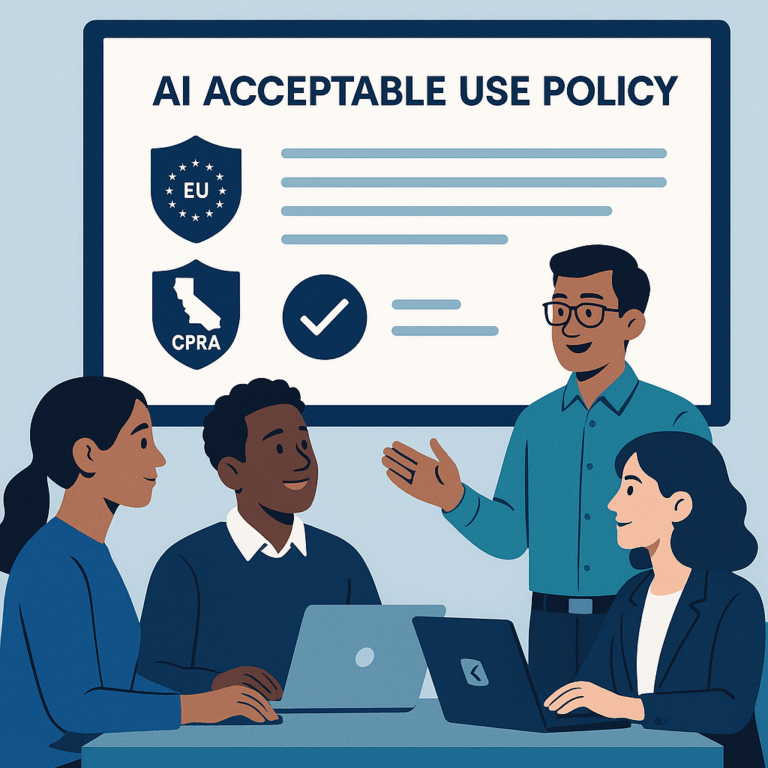
This policy defines acceptable use of AI tools (including generative models, copilots, and hosted APIs) to protect personal data, preserve customer trust, and comply with applicable privacy laws (e.g., GDPR and California privacy laws).
Scope
Applies to all employees, contractors, vendors, and third-party agents using company-provided AI tools or using AI to process company or customer data.
Key rules (short list)
- Do not input unredacted personal data of EU/EEA individuals into public or unapproved AI services unless you have a lawful basis and a documented Data Protection Impact Assessment (DPIA). Our POV: treat prompt inputs like any other data export from the CRM.
- Do not input sensitive personal information (e.g., health, race, precise geolocation, government ID numbers) into a model unless specifically approved by Security and Legal and documented in the tool registry.
- Use only vendor-approved AI endpoints listed in the company AI registry. If an ad-hoc tool is needed, request an exception and a technical review.
- Human review required for: outbound messaging to customers, contract summaries for legal teams, and customer-facing decisions influenced by AI.
- Store prompts and outputs only in approved systems; mark any AI-derived customer data in the CRM with an audit tag and retention rule.
- All users must complete required role-based AI training and attest annually to this policy.
Data handling & legal checkpoints
For EEA personal data, document your lawful basis (e.g., consent, legitimate interests) and minimize what’s shared with models. Keep a record of processing activities. The GDPR applies to organisations established in the EEA and to organisations targeting or monitoring individuals in the EEA. What is the GDPR?
In the U.S., California’s CPRA/CCPA gives consumers rights like to know, delete, and limit use of sensitive personal information; confirm applicability against the thresholds and follow required notices. California Consumer Privacy Act (CCPA). The CPPA (California Privacy Protection Agency) now enforces those rules for California. California Privacy Protection Agency.
Enforcement and exceptions
Noncompliance may lead to disciplinary action. Exceptions must be approved by Security + Legal and be time-boxed and logged in the AI tool registry.
Practical rollout plan (90 days)
Lead with policy, follow with training, then measure. Here’s a lean plan that aligns to RevOps tempo and sales cycles.
- Week 0: Publish the one-page AUP and add an FAQ. Require attestations from all SDRs and sales managers.
- Weeks 1–2: Deliver 10-minute micro-lessons (role-based) in Teams or Viva; highlight banned inputs and show safe prompt examples. Assumes a mid-market CRM stack and email channels.
- Weeks 3–4: Run an audit: sample prompts, verify tags in CRM, check retention settings, and close exceptions.
- Months 2–3: Add targeted coaching, integrate attestations into onboarding, and show adoption analytics (completion %, policy exceptions, incidents).
Attach the AUP to your onboarding path so new hires see rules before they use AI on real leads. That combination of comms + micro-lessons + analytics is exactly what BrainStorm automates—segment the audience, schedule the messages, deliver the micro-lessons, and track attestations. BrainStorm AI Security pack.
Quick risk matrix
| Risk | Likelihood | Mitigation |
|---|---|---|
| EU personal data leaked to public model | Medium | Ban unredacted inputs; require DPIA and approved endpoint |
| Sensitive info used in prompts | High | Block sensitive categories in UI; role-based training |
| Deceptive outputs harming consumers | Medium | Human review for customer-facing content; FTC risk monitoring |
Application: how this looks for RevOps and Demand Gen
RevOps leaders want consistent, audit-ready processes. Add an “AI use” field to contact records for any contact generated or modified by a model. Require an attestation step in the CRM for any lead-qualified-by-AI. This creates a short audit trail and reduces disputes about origin and consent.
Demand Gen teams can keep personalization while staying compliant by using templates with safe placeholders (company, role, industry) and avoiding freeform customer quotes in prompts. Authorize a vetted model for content drafts and require manual review before sending.
Common objections and how to answer them
“This will slow our SDRs.” A short AUP plus role-based micro-lessons adds a minimal friction step but prevents incidents that stop outreach entirely. Training can be delivered in 10 minutes and attestation completed in a click.
“Legal will never sign off.” Start with pragmatic protections: block sensitive fields, whitelist tools, log prompts, and require DPIAs for high-risk use. Those steps win legal buy-in faster than an all-or-nothing ban.
“We need faster adoption.” Use a pilot cohort of power users. Measure compliance and time-savings; then scale while keeping the one-page policy and attestations in place.
How BrainStorm helps
Outcome: Policy + practice, enforced and measured.
How we do it: Deliver role-based micro-lessons and communications in Teams/Viva, collect attestations, and show adoption by cohort in a dashboard. See the AI Security pack.
CTA: See your M365/Copilot adoption in a live dashboard—book a 20-minute demo. BrainStorm | Software Adoption Made Easy
FAQ
Q: Do I need a DPIA for every AI use?
A: Not always. High-risk processing (e.g., automated decision-making affecting rights, large-scale profiling, or processing sensitive categories) usually needs a DPIA under GDPR. For lower-risk assistive uses, document your lawful basis and data minimization steps.
Q: Can SDRs use public AI assistants for quick drafts?
A: No for raw customer data, yes for safe, redacted templates. The policy should ban copying identifiable customer fields into public models and provide approved endpoints and patterns for safe use.
Q: How does U.S. law affect this policy?
A: U.S. federal law is patchwork, but state laws like California’s CPRA impose clear consumer rights; the FTC enforces against deceptive or unfair AI practices. Map your obligations by region and include state-specific steps in the annex. FTC guidance. CCPA/CPRA details.
Sources
What is the GDPR? | European Data Protection Board
California Consumer Privacy Act (CCPA) | State of California – Office of the Attorney General
California Privacy Protection Agency (CPPA)
AI and the Risk of Consumer Harm | Federal Trade Commission
Guidance on AI and data protection | ICO
Meta description: AI AUP template for GDPR and U.S. privacy—copyable policy, rollout steps, and a risk matrix for RevOps and security teams.
Suggested slug: ai-acceptable-use-policy-gdpr-us-privacy-aware