
Last reviewed: November 19, 2025
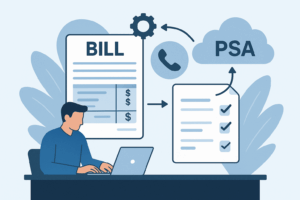
You’ve just won 200 seats of Teams Phone or resold a bundled UCaaS stack. The PSA shows the project. Carrier CDRs are incoming. Finance asks: “Who owns the telecom taxes — and where do they live?” If you treat Avalara for Communications as a checkbox, week one becomes month‑long disputes and extra GL adjustments. Treat it as a configuration workflow and you stop most first‑cycle tax errors before they appear.
TL;DR — In the US, MSPs using Datagate must focus week one on three things: declare transaction types for each CDR and recurring item, configure explicit sourcing rules for origin/termination and fallbacks, and validate invoice‑line tax codes and GL mappings in a staging invoice. Do those three and you prevent the majority of first‑cycle disputes, reduce manual reconciliation, and keep QuickBooks or Xero postings clean. Start by downloading the PSA to invoice field‑mapping guide and the US telecom tax checklist.
Why week one matters now
State and local telecom taxes are a moving target. Wireless and telecom fees vary by state and city and now include dozens of surcharge types, from 911/988 fees to state USF collections. That complexity means a single mis‑sourced call or an untagged surcharge can create disputes and an audit trail you don’t want to explain. The Tax Foundation’s recent state wireless tax data shows the real cost and spread of these levies across jurisdictions. Tax Foundation — Taxes on Wireless Services, 2025.
Practically, Avalara positions AvaTax for Communications as the specialist product that handles communications‑specific rules, geolocation sourcing, and ongoing rate updates; but it needs correct inputs: transaction type, sourcing, and invoice line structure. See Avalara’s product description for communications tax. Avalara — AvaTax for Communications.
Our point of view: compliance is a setup workflow, not a checkbox
Datagate’s POV is simple: treat Avalara for Communications as configurable software that requires three week‑one activities to be safe in production. If you instrument transaction types, make sourcing explicit, and validate the invoice preview down to the tax code and GL account, you eliminate most first‑cycle problems. This is not theoretical. Telecom audits and truth‑in‑billing issues arise when defaults or ZIP‑only sourcing are left in place. Avalara’s guidance and industry writeups warn that ZIP fallbacks and generic defaults cause misallocations in home‑rule and origin/termination states. Avalara blog — communications tax pitfalls.
Three practical trade‑offs to accept up front: you’ll spend 2–4 hours mapping representative samples in week one; you’ll delay the first live invoice by a day or two for staging validation; and you’ll need one owner (ops or finance) to sign the preview. These small costs buy recurring savings: fewer GL edits, fewer disputes, and cleaner AR.
Week‑one framework: map, source, validate
Here’s the short runbook you can execute in five working days. Each step is designed to be low‑friction and testable.
- Map transaction types — For each representative CDR and recurring/one‑time charge, declare the Datagate transaction type (examples: Calling Minutes, SIP Trunk Charge, Recurring License, Porting Fee) and assign the Avalara transaction code you expect. This prevents “generic service” classification that creates tax under/overcharges.
- Configure sourcing rules — Set origin vs termination handling, street‑level geolocation fallbacks, and billing‑address fallbacks for pooled or mobile lines. Don’t rely solely on customer ZIP codes for sourcing in home‑rule jurisdictions.
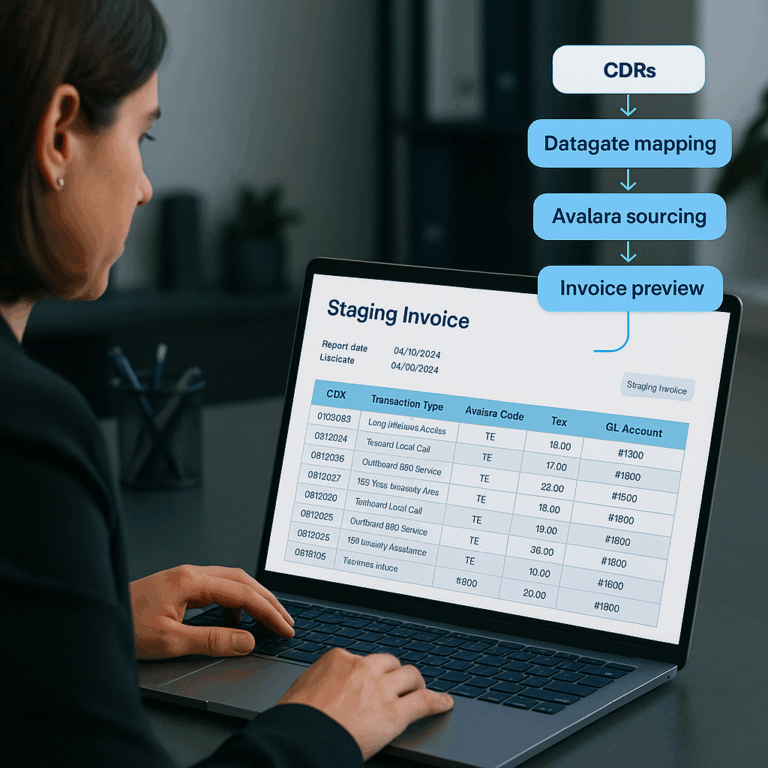
- Validate invoice preview and GL mapping — Generate a staging invoice in Datagate, run it through Avalara, and inspect every invoice line: rate, tax code, jurisdiction, and the QuickBooks/Xero GL target. Sign off before posting.
Diagram (one line description): CDRs and recurring catalog items → Datagate transaction mapping table → Avalara sourcing & tax calculation → Datagate invoice preview with GL mapping → Post to QuickBooks/Xero. For field details, export a 6‑column mapping table: Datagate field | Datagate transaction type | Avalara transaction code | PSA line description | QuickBooks GL account | Validation rule.
What MSPs (billing owners and systems engineers) must configure in week one
Assumes a mid‑market MSP stack with Datagate, a PSA (ConnectWise/Autotask), and QuickBooks Online or Xero. If your stack differs, adapt the same steps to your accounting export.
Day 0 — Roles & access: assign an Owner (ops or finance), a Technical lead (Datagate admin), and a Tax reviewer (internal or short consult). Confirm API/SFTP and Avalara account credentials.
Day 1 — Export samples: pull 8–12 representative CDRs and 8 recurring/one‑time invoice lines that cover every product family you sell (voice, trunking, licenses, mobile). Include edge cases: pooled minutes, conference bridges, and one‑time port charges.
Day 2–3 — Transaction mapping: complete the 6‑column mapping table for each sample. Each sample needs an Avalara communications transaction code or clearly documented tax treatment. Use the Datagate integrations hub for field names and the PSA to invoice field‑mapping guide to align PSA line descriptions.
Day 4 — Sourcing configuration: set origin and termination handling and confirm fallback logic (billing address, device location, or customer provided POI). Test three staging invoices covering differing jurisdictions. In practice, ZIP fallbacks often mis‑assign tax jurisdiction for wireless calls — don’t assume ZIP = correct sourcing. For an industry view on sourcing complexity see the Mobile Telecommunications Sourcing Act and Avalara’s sourcing recommendations. Mobile Telecommunications Sourcing Act excerpt and Avalara — AvaTax for Communications.
Day 5 — Preview validation & signoff: run a staging invoice through Avalara, inspect each tax line, confirm GL targets in QuickBooks/Xero, and get Owner signoff before posting. Use the QuickBooks posting guide to confirm expected GL post structure and avoid split lines.
Quick acceptance checks
- Every sample invoice line has an Avalara communications transaction code assigned.
- At least three staging invoices reflect expected tax totals across different jurisdictions.
- QuickBooks/Xero post contains a one‑to‑one mapping from Datagate invoice lines to GL accounts (or a documented exception).
Proof: a real pattern that stops disputes
Situation: an MSP launched Teams Phone + mobile to 350 seats and saw split tax lines and three disputes on the first invoice. Finance spent a week reconciling. Intervention: Datagate followed the week‑one checklist—explicit transaction mapping, origin/termination sourcing rules, and a staging invoice signoff. Result: zero disputes on the first two billing cycles and only one GL correction in 60 days. Mechanism: mapping + sourcing + preview validation removed ambiguity that triggers manual adjustments.
Industry context: communications tax is complex and evolving; Avalara emphasizes continuous monitoring and street‑level jurisdiction assignment to prevent surprises, and industry analyses show wireless taxes and fees are significant at the state/local level. Avalara — AvaTax for Communications; Tax Foundation — wireless taxes, 2025.
Objections and common pushbacks
“We don’t have a tax person.” You only need one Owner and representative samples. Datagate’s checklist reduces complexity to a few sourcing decisions and transaction classifications. If a transaction is ambiguous, get one short tax consult on that item rather than a full audit.
“Avalara defaults worked before.” Defaults are generic and often misclassify telecom edge cases (pooled minutes, conference bridges, termination exceptions). Avalara and industry guidance warn that ZIP‑only sourcing and defaults cause misallocations. Test with real CDRs before you trust defaults. Avalara blog — pitfalls.
“We don’t have engineering time.” The week‑one mapping is administrative — a spreadsheet of 10–20 mappings. Datagate’s connectors mean fields already exist; the work is validation, not heavy development. Use the Integrations docs and the Support team to accelerate the work.
How Datagate helps: Outcome — Clean, compliant invoices and fewer disputes on your first cycle. How — Datagate enforces transaction‑first mapping, staging invoice previews, and automated posting to QuickBooks/Xero while integrating with communications tax engines. Book a Datagate + Avalara walkthrough.
Quick FAQ
Q: How do I choose the Avalara transaction code for a CDR line?
A: Start with the service family (calling, trunking, mobile, recurring license, one‑time charge). Match that to the Avalara communications transaction list and capture the mapping in your 6‑column table. If unsure, mark as “review” and proceed to staging tests.
Q: What sourcing fallback should I use for pooled mobile minutes?
A: Use device or account primary place of use where available. If not, document the billing address fallback and test a few termination points. Home‑rule states and origin/termination rules need explicit exceptions — don’t rely on ZIP only. See the Mobile Telecommunications Sourcing Act context. Sourcing Act excerpt.
Q: How will I measure success after week one?
A: Leading indicators — mapping table complete and test invoices reconciled with zero tax adjustments. Lagging indicators — dispute count and GL corrections down across the first two billing cycles.
Sources
Datagate — Integrations (PSA field mapping)
Datagate — US telecom tax checklist (Solutions)
Datagate — QuickBooks Online integration
Datagate — Support
Avalara — AvaTax for Communications
Avalara blog — communications tax pitfalls
Tax Foundation — Taxes on Wireless Services, 2025
Mobile Telecommunications Sourcing Act excerpt (congressional record)